
Making Tax Digital – a guide for Sole Traders
Last Updated on 4 September 2026
Been on a course? Download selected MTD slides here >

‘Making Tax Digital for Income Tax’ (MTD for IT) is a big change for sole traders and landlords.
In this section I’ve tried to include the information most useful for sole traders working in the creative industries.
Click on this topic list to jump down the page. Or simply scroll down to read everything.
- What is MTD for Income Tax?
- Do you need to register for MTD?
- Do new sole traders have to register straight away?
- What is MTD software?
- What if your turnover falls below the compulsory threshold?
- Is MTD a good idea? (A personal view)
- What about Limited Companies
- ‘Find out more’ box (Links to gov.uk etc)
- FreeAgent discount link
Since creating this guide, HMRC have developed their own page explaining MTD:
https://makingtaxdigital.campaign.gov.uk/how-making-tax-digital-works/ (opens in new tab)
What is MTD for Income Tax?
In short, HMRC is continuing the process of digitising the tax system which began in the 2010s.
From April 2026 some sole traders and landlords will be required to:
- report income and business expenses every 3 months
- use special ‘cloud accounting’ software to do it
The date for reporting income tax in this way by some sole traders is April 2026 (delayed countless times for countless reasons).
HMRC has said you only have to use MTD from April 2026 if your sole trader turnover was more than £50,000 in the tax year 2024-25.
From April 2027 the threshold will be £30,000 in the tax year 2025-26, thereby drawing more sole traders into the MTD reporting system.
In the Spring Statement documents on 26 March 2025 the Treasury announced the threshold of qualifying income will drop to £20,000 per year from 6 April 2028, based on your earnings in the tax year 2026-27.
If you want to be part of MTD below the compulsory thresholds you will be able to.
Do you need to register for MTD for Income Tax?
What does HMRC mean by ‘an annual turnover of £50,000’? Well they’ve created an online tool which helps sole traders and landlords to work out if they have to become part of the MTD process.
The tool is quite simplistic on its own. So I recommend the first step is to look at what they mean by ‘qualifying income’.
Remember if you have a mix of PAYE and sole trader income, it’s ONLY the sole trader bit of your work that they are interested in here. PAYE income does NOT count toward the qualifying total.
- Step 1: Do you have any ‘qualifying income’ for MTD for Income Tax > (opens in a new tab)
- Step 2: Check if you need to register for MTD for Income Tax > (opens in new tab)
There’s also a step by step guide from HMRC here > (opens in new tab)
Do new sole traders have to register straight away?

There’s always a bit of a lag between becoming a sole trader and having to use the MTD quarterly reporting system.
This is because there is a turnover (income) threshold.
HMRC needs to know that you’ve hit the relevant turnover threshold before making you use MTD reporting.
So sole traders won’t necessarily have to start using the MTD system until two tax years AFTER the year where they hit the threshold.
This is why MTD is compulsory for sole traders from the start of the 2026-27 tax year ONLY IF they had a turnover greater than £50,000 in 2024-25.
Why a single sole trader may need multiple MTD registrations

One of the headaches with the new approach is that, although you think of yourself as one person, HMRC sees you through the prism of ‘trades’ that you carry out.
If you earn money in a number of different ways as a sole trader, HMRC may see you as having multiple trades.
This means you might need multiple MTD registrations.
So someone who’s a TV freelancer AND makes clothes to sell on Vinted is running two trades.
This would require registering twice for MTD (once for each trade), keeping separate records and doing reporting for each trade separately every three months.
If you rent out property as a sole trader/landlord, HMRC sees this as a separate activity/income stream from other earnings. So you would need a separate MTD registration for that too.
(See below for my personal view on all this.)
What is MTD software?

HMRC approves commercial software that works with Making Tax Digital for Income Tax. We’ve listed a few likely contenders below. Note/disclaimer: We have no idea if all the authorised software is any good. We haven’t tested them all!
Originally HMRC said everyone would have to use a proper software package to do quarterly reporting. They are now allowing ‘bridging software’ which will look at a bog-standard spreadsheet and upload the relevant figures to HMRC.
Bridging software might be cheaper, but it only does the very basic element of reporting. And you’ll have to set up the spreadsheet in precisely the right way to allow the bridging software to work.
So if you’re looking at MTD software for the first time, consider what you might want to use it for in future.
For example, some software packages do quarterly reporting but NOT the final tax declaration (tax return). Some does MTD for income tax but NOT MTD for VAT.
If you are a sole trader who might want to be VAT registered in future you’d probably want to get software that does everything.
MTD software is going to be a moving target for a while. Expect tie-ups, special deals, mergers and even software companies going under.
Recent examples of tie-ups are NatWest/RBS/Ulster Bank and FreeAgent >, Tide and Sage >, Monzo and Sage >. (links open in new tab)
Starling (a bank) bought Ember (a financial software firm) in the summer of 2025, as a way of covering all the bases. This is now seamlessly incorporated into its sole trader business bank accounts.
Watch out for claims of ‘free’ or ‘freemium’ apps. This usually means that you have to pay for things like invoice creation within the software.
Also be aware that announcements about ‘free MTD software’ might be time-limited, like the hook up between Virgin Money and Xero which only makes Xero free for 6 months.
Also with Xero, members of the Federation of Small Businesses get the slightly random discount of 95% but only for six months.
Read the small print.
Having said that, there are stand-alone apps that can be hooked up to your bank account regardless of who you bank with. Go Get Paid is an interesting example of this approach >
I’ve also had some good reports about VT Software and Untied for some of the basics, though I have no personal experience of them. (At your own risk!)
What does the software actually do?
It allows you to keep records of money going in and money going out to/from your sole trader business.
Software packages work best when you link them to the bank account you use for your sole trader affairs. Having a separate bank account for your sole trader stuff is essential to get this to work slickly.
This automates the record-keeping in a magical way. All you then have to do is ‘tag’ the individual transactions using drop down boxes to describe them.
The software will only report income labelled as business income, and outgoings labelled as business costs. So once your transactions are labelled correctly, the quarterly reporting is a simple click.
HMRC doesn’t see anything except the totals of business income and the total of business costs. HMRC doesn’t get into your bank account! HMRC doesn’t get sent any receipt photos you might have added in the software. HMRC doesn’t even get equipment costs (‘capital allowances’). It just gets the two totals: turnover and day-to-day running costs.
How do I label/tag money I pay myself to live on?
It’s important that money you take out of your sole trader account for your personal life (living costs etc) is NOT labelled as business costs.
So do NOT label personal costs as ‘salary’ or ‘staff costs’.
Different software packages will have different labels for personal money. There may be an option called “non-business categories”, or “drawings”
Check with your software provider. The good providers always have a knowledge base to deal with these common questions.
What if your turnover falls below the compulsory threshold?
If you’ve already been in the MTD reporting system in certain circumstances you will be able to revert to non-MTD tax reporting.
You’ll need to keep an eye on your turnover total for the tax year.
Currently HMRC says you will be able to ditch MTD only after your turnover is below the compulsory threshold for three consecutive tax years.
Read more on gov.uk here >
Is MTD a good idea? A personal view
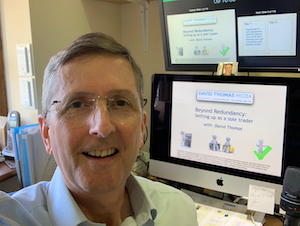
The introduction of MTD for sole traders was originally meant to happen in 2018, so I’ve been talking about it on training courses for about 10 years.
I’ve also been using digital software (FreeAgent in my case) voluntarily since 2017 so that I could form a view. FreeAgent also does my VAT since using accounting software for VAT reporting became compulsory.
Pros…
I like the digitisation as it saves me time. The big advantage is being able to use the associated app on my phone to keep records as I go along.
When I’m working on the move, I can link photos of rail tickets, receipts etc. in the software’s mobile app.
It’s also very slick when you hook up the software to keep an eye on the ins and outs of your business bank account.
When a payment is made from your bank, the software notices and asks you to select the payment category from a drop down list.
I love how the software can be used to create and send invoices quickly.
I love how it does the quarterly VAT reporting at the click of a button.
Cons…
HOWEVER, at time of writing most of the software that does all the useful stuff costs money. An annual subscription of £250 is not unusual.
There is much cheaper software but it won’t do any of the things I really love that save me time. (see above)
I think this is a moral problem. Sole traders are being told to buy commercial software in order to comply with tax rules.
Making sole traders choose from dozens of authorised software packages is cruel. Who has the time to research?
Lowering the income threshold to £20,000 from 2028 is doubly cruel for the lowest earning sole traders.
In my view HMRC should have provided a free basic software tool for those with low incomes, just as they did with digital payroll reporting for the smallest businesses with up to 10 employees.
Free MTD software from HMRC was ruled out from the start when the Conservatives were in power. The £20,000 threshold was announced in 2025 under Labour.
The ‘multiple trades’ issue
I predict a growing area of contention is the need to have multiple MTD registrations for multiple ‘trades’.
HMRC says that if you earn with different types of activity you need to separate out the reporting using separate MTD registrations.
The most efficient way would be to have separate bank accounts for each ‘trade’.
But you’d also need separate software accounts for each income type. This could increase costs, especially as some software is free, but only for the first account.
This will really clobber people who earn a living from multiple separate unrelated activities. (A real life example: someone who is a TV freelancer but also runs wellness activities.)
I suspect HMRC didn’t realise people live like this. They probably saw sole traders as ‘once a plumber, always a plumber’.
FreeAgent has a very good (if sobering) article on the practicalities: Read it here > (opens in new tab)
David’s Pet Threshold Theory
Why did they pick £20,000 as the threshold from 2028?
My pet theory is when nearly every sole trader is using software for income tax reporting they’ll reduce the VAT registration threshold to £20,000.
That’s way way lower than the current £90,000 VAT threshold, but closer to the international average for VAT registration. And it would raise a load of money for the Treasury.
If it happens, you heard it here first and my middle name is Nostradamus.
If it doesn’t, don’t @ me.
updated August 2026
What about Limited Companies?
Limited companies will have to report some information using special accounting software from April 2027, but HMRC seems to have ditched the idea of quarterly reporting for companies.
For limited company freelancers (so-called “micro entities”) it will just be the profit and loss statement and balance sheet that needs to reported digitally at the end of the year.
The chances are you are using an accountant if you’re running a company, so they will already be on top of all this.
(If they’re not, get a different accountant.)
Meanwhile, any business with turnover above the VAT threshold (£90,000 in 2026-27) has had to report VAT using a quarterly reporting system since April 2019.
From April 2022 even the smallest VAT-registered business has had to use MTD software for their quarterly VAT returns.
This means there are already loads of software options for MTD for VAT.
Find out more:
www.gov.uk/…-making-tax-digital – loads of MTD info
www.gov.uk/…/using-making-tax-digital-for-income-tax – how to use MTD for income tax
Commercial ‘cloud-accounting’ software:
www.freeagent.com – targeting itself mainly at small businesses and freelancers
www.xero.com – focussed on limited companies and sole traders
www.quickbooks.com – long established accounting software
www.sage.com – well-established and used by large businesses too
HMRC list of MTD for Income Tax-compatible software:
www.gov.uk/guidance/software-for-sending-income-tax-updates
Disclaimer: We’re not saying any of these software providers are good or bad. Check them out at your own risk. If you have an accountant they should recommend the most appropriate.
We’re not pushing FreeAgent in particular, but it’s the one David Thomas Media uses. If you decide to go for it, you can get 10% off by clicking this button:

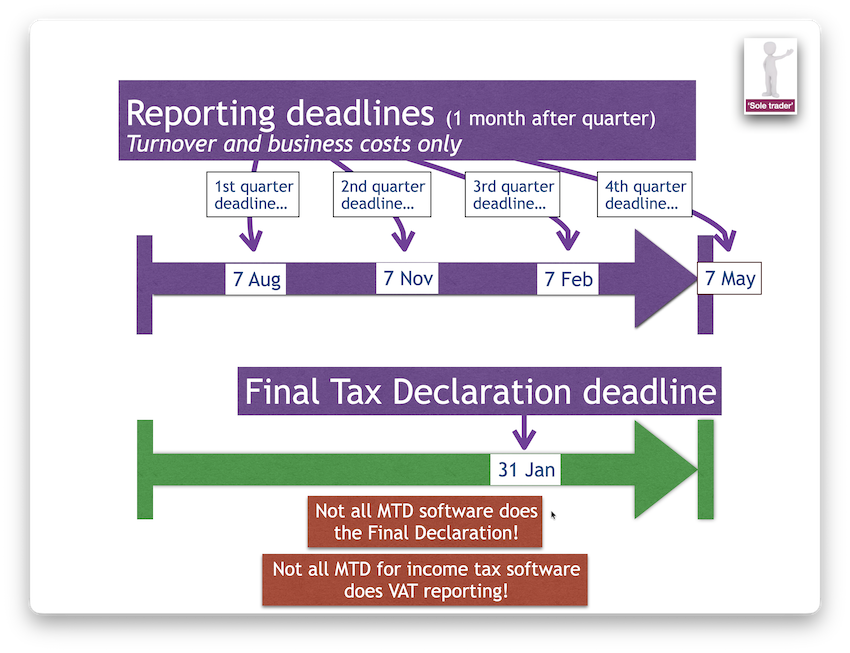
Income tax reporting example – Sole Traders:
Before Making Tax Digital:
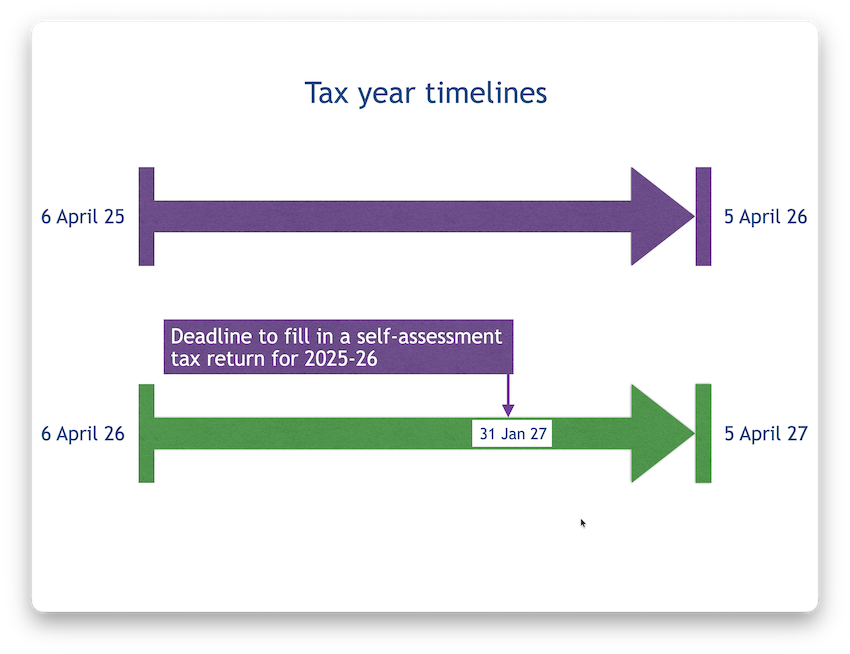
After Making Tax Digital:
Please note:
Although every effort has been made to provide accurate tips and information, David Thomas Media Ltd accepts no responsibility for any errors, omissions or out-of-date facts. Trainees are advised to seek up-to-date professional advice on all financial and tax matters before making decisions relating to these subjects. Nothing in our notes, courses, webinars, downloads or social media should be considered as financial advice.
We believe our tips are useful - but they are only tips!
NB: David Thomas Media Ltd is not responsible for the content of other sites nor any financial advice provided by them.