
Helpsheet 7: Invoicing (incl template)
Last Updated on 30 October 2026
Read this in conjunction with two important helpsheets:
The golden rule with invoicing is ‘quickly and often’. Don’t put your invoicing off. You might forget altogether!
A lot of accounting software will automate the creation of invoices. The important thing is to add the payment terms and late payment interest statement at the bottom.
The image below shows some of the things to get right on an invoice, for example:
- Send it to the right person – with big organisations it’s often someone different from the person who gave you the work.
- Put a date on the invoice. It helps identify when payment is due, and when you’re chasing things up.
- Does the payer require you to put special codes on your invoice to get the payment processed? These are called a purchase order number (identifying this specific payment/job) or vendor/supplier number (identifying you).
- Put your payment terms at the bottom. The payer will probably ignore them, but the statement is very useful if you find a payer is very tardy in getting your money to you.
- Add the statement referring to the late payment legislation. It makes you look professional and will be really useful if they turn out to be a bad payer.
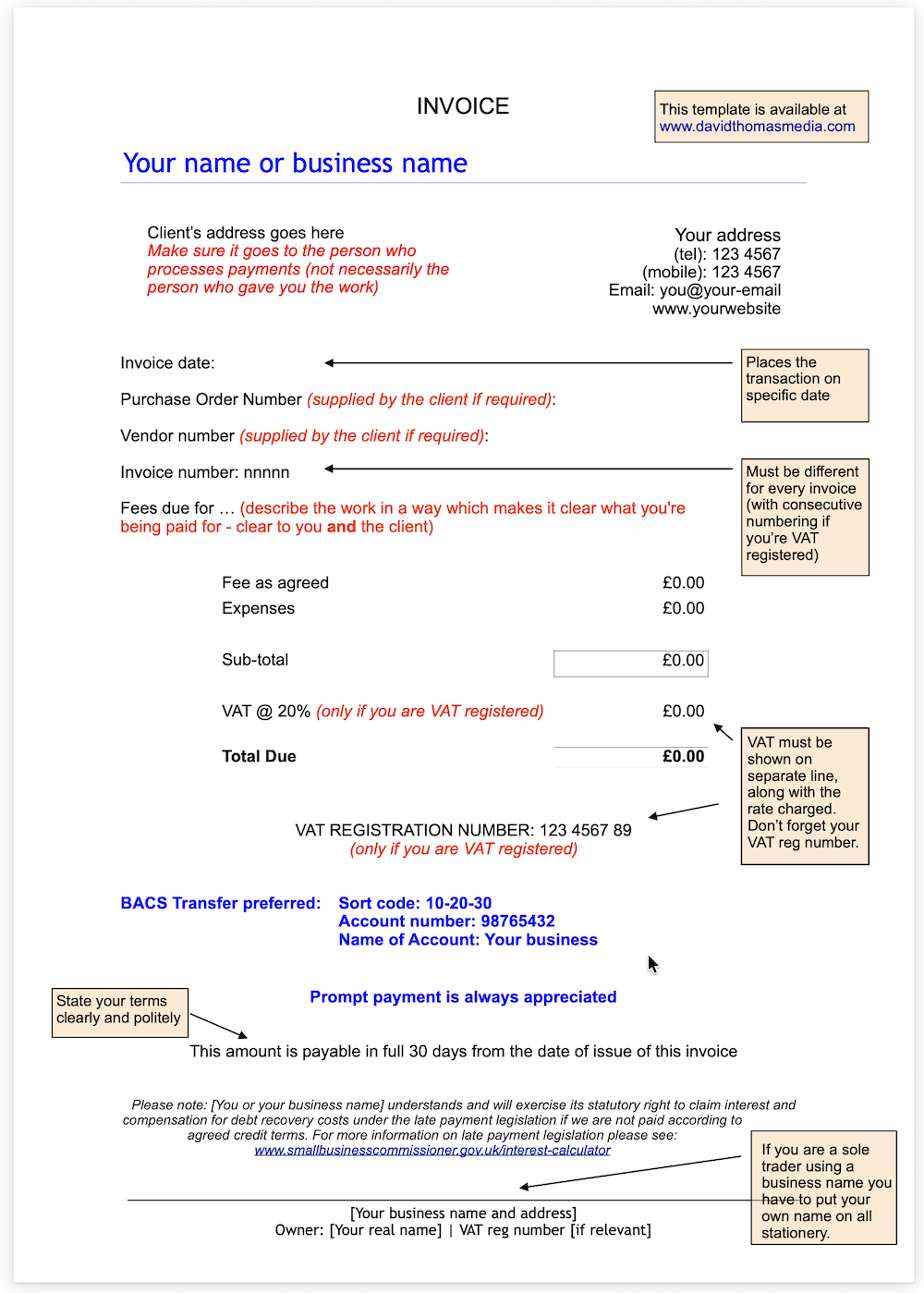
You can download this annotated invoice by clicking the image above, or here.
We also have a downloadable blank template for you as a Word doc:
Invoice template in MS Word format >
Now take a look at these two important helpsheets: