
How to register as a Sole Trader (self-employed)
Last Updated on 12 July 2024
The process of registering as a sole trader (i.e. becoming self-employed), is simple in theory.
Officially you’re setting up a type of one-person business. But there’s not much bureaucracy as you are a person and a business at the same time. There are no big legal issues to deal with.
Having said this, the registration pages have changed a little bit, which can be confusing in practice.
To cut to the chase: you’re going to need to set up your personal tax account on gov.uk if you want to complete the process online. This is useful to have anyway, even if you’re not a sole trader.
They are now taking you to a ‘register as a sole trader’ page…

….on which you need to click on ‘Check how to register for Self Assessment‘.
Then click the ‘Start now >’ button at the bottom…

Step 1 is the confusing bit. It asks if you are registering for self-assessment because you’re self-employed.

Click ‘you’re self-employed’, even if you’re not yet self-employed!
Step 2 asks you if you’re already a sole trader or not…
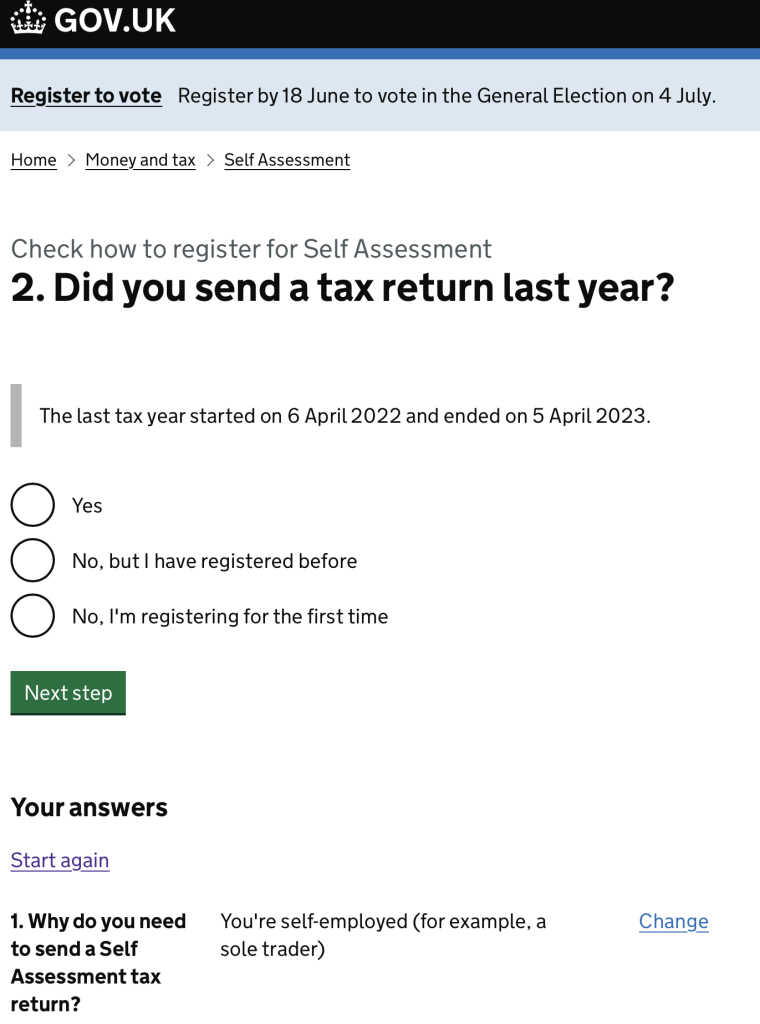
Once you click ‘No. I’m registering for the first time’, it will take you to a page that explains you need to sign in to your personal tax account and do everything from there.

I’m sure there’s a logic in taking people through all these steps. It’s presumably to filter out people who have already got self-assessment set up for a different reason, and who don’t understand the term ‘sole trader’.
NB: David Thomas Media Ltd is not responsible for the content of other sites nor any financial advice provided by them.
Posted on 04 June 2024
